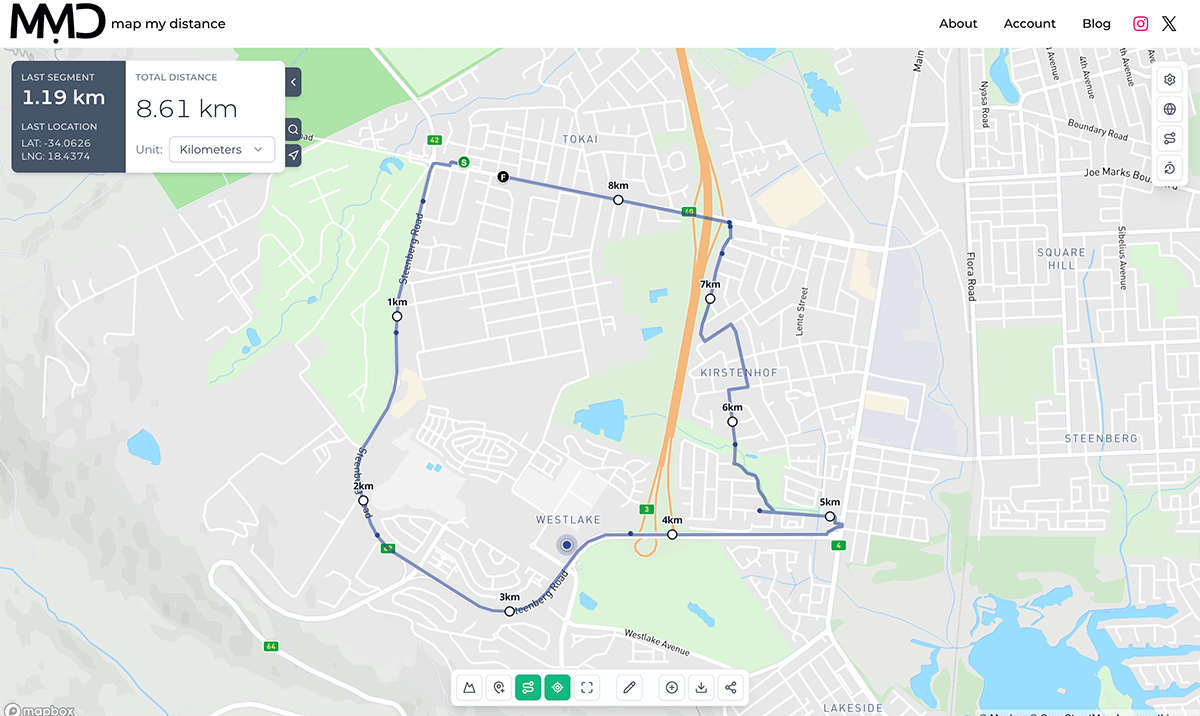
Planning a running route online is simple: choose your starting point, add points along the roads or trails you want to follow, and adjust the route until you reach your target distance. With Map My Distance, you can also check elevation, snap your route to roads and paths, save it and share it with others.
Plan Running Routes Online using Map My Distance’s running route planner.
Create a custom running route in minutes.
✓ Snap to roads
✓ Measure distance instantly
✓ View elevation profiles
✓ Save and share routes
✓ Works worldwide
Planning a running route online is one of the easiest ways to prepare for your next run, whether you are training for a race, exploring somewhere new, or simply trying to hit a specific distance.
With Map My Distance, you can create a running route directly on the map, measure the total distance, calculate pace, check elevation, follow roads and paths, and make changes before you head out.
You can also save your route, add points of interest, and share it with other runners.
In this guide, we’ll show you how to plan a running route online step by step.
How to Plan a Running Route Online
Creating a running route only takes a few minutes. Start by deciding where you want to run, then build your route on the map and adjust it until the distance and elevation suit your goals.
Choose Your Starting Point
Start by searching for the area where you want to run or zooming into your location on the map.
Your starting point could be your home, a trailhead, a park, a race venue, or anywhere else you want your route to begin.
Once you have found the right location, place your first point on the map.
Add Points to Build Your Route
Continue adding points along the roads, paths, or trails you want to follow.
Map My Distance can connect your points to help create a clear route between them, allowing you to build short runs, long runs, loops, or point-to-point routes.
You can keep adding and adjusting points until the route follows the path you want to take.
Check the Distance
As you create your route, Map My Distance calculates the total distance automatically.
This makes it easy to build a route around a specific goal, such as:
- 5 km
- 10 km
- Half marathon distance
- Marathon distance
- Long training runs
- Trail running routes
If your route is too short or too long, simply adjust your points until you reach the distance you want.
Check the Elevation
Distance is only part of what makes a route challenging.
Elevation can have a major impact on how difficult a run feels, particularly when planning trail runs or routes in hilly areas.
Map My Distance lets you view the elevation profile of your route so you can see where the major climbs and descents are before you run.
This can help you choose a flatter route for an easy run or deliberately add more climbing for hill training.
Adjust Your Route
Once your route has been created, review it before saving.
You may want to:
- Add or remove distance
- Avoid a busy road
- Include more trails
- Add a climb
- Create a loop back to your starting point
- Pass a water stop or landmark
Small changes to your route can make a big difference to the overall experience.
Save and Share Your Running Route
When you are happy with your route, save it to your Map My Distance account so you can return to it later.
Saved routes can be useful for training plans, race preparation, repeat runs, and sharing routes with friends.
You can also share your route with other runners so they can view the distance, elevation, and route directly on the map.
Why Plan Your Running Route Before You Run?
Planning your route before heading out gives you a much better idea of what to expect.
Instead of guessing the distance or deciding where to turn while you are running, you can prepare the full route in advance.
This is especially useful if you are:
- Training for a specific distance
- Running in a new area
- Preparing for a race
- Looking for more elevation
- Trying to avoid busy roads
- Planning a long trail run
- Running with a group
A planned route also makes it easier to compare different options before deciding where to run.
Plan Routes for Road Running and Trail Running
Map My Distance can be used to create routes for different types of running.
Road runners can plan routes around streets, parks, and quieter roads while keeping track of total distance.
Trail runners can use the map to explore longer routes, check elevation, plan climbs, and prepare for running in more challenging terrain.
Whether you are planning a quick 5K or a long-distance trail route, having the route mapped beforehand can make your run easier to prepare for.
Create Running Routes for Race Training
Route planning is particularly useful when training for an upcoming event.
For example, if your target race is 30 km with significant elevation gain, you can create training routes that gradually build toward similar distance and climbing.
You can also save different routes for:
- Easy runs
- Long runs
- Hill sessions
- Tempo runs
- Race-specific training
- Weekend trail runs
This gives you a library of routes you can reuse throughout your training.
Start Planning Your Running Route
You do not need to guess your running distance or rely on the same route every time.
Use Map My Distance to create a running route online, measure the distance, check the elevation, and adjust the route until it matches the run you want to do.
Plan your next route with the Map My Distance Running Route Planner.
Map My Distance Calculated Distance
As you place markers on the map, the total distance of your route is automatically calculated. You’ll also see a last segment calculation which is displaying the distance between the last 2 markers placed on the map.
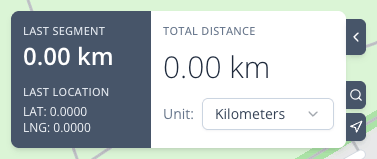
This is incredibly useful for runners looking to hit specific mileage goals. You can switch between kilometers and miles (and even meters, feet or yards if needed), depending on your preference, making it versatile for users worldwide.
Map My Distance can also be used for planning cycling routes, work out walk routes and even planning hikes with elevation.
Share Your Route with Friends
Running with a group or training together with friends?
Map My Distance allows you to share your routes with others. You can send them the link to your route, and they’ll be able to view and even collaborate on it if you’ve enable collaboration.
It’s a great way to plan group runs, virtual races, or share your favorite running spots with fellow runners.
Collaborating on Routes
One of the standout features of Map My Distance is the ability to collaborate on routes.
This is perfect for group runs, team training, or custom challenges. With this feature, multiple people can work on the same route, if needed. So whether you’re planning a charity run, organizing a neighborhood running group, or preparing for a team race, you can have someone else help you plan a run.
Additionally, Map My Distance keeps track of the route owner and route collaborators, listing the route in each persons account, and then, as a route owner, you can turn the collaboration off so other users are only able to view the route when you share it.
Tips for Making the Most of Your Routes
- Explore New Areas: Use Map My Distance to find new paths and trails in your area. Don’t be afraid to experiment with new routes, even in familiar locations.
- Plan for Challenges: Whether it’s hills, roads or terrain, keep in mind the challenges you might face along your route. Planning ahead will help you stay prepared.
- Track Your Progress: Use your saved routes to track your improvement over time. Are you running faster on the same route? Are you able to go further than before? Keeping a log of your routes will help you see your progress clearly.
- Run Safely: Always choose routes that are well-lit, safe, and populated, especially if you’re running alone.
Start Planning Your Perfect Running Route Today!
Planning your runs has never been easier.
With Map My Distance, you have the tools to create, save, and share routes that fit your running goals. Whether you’re a beginner or a seasoned marathoner, the ability to map out your routes in advance will make every run smoother and more enjoyable.
Head over to Map My Distance today and start planning your perfect running route!